Installing Docker and Docker Compose on a VPS Using a Ready-Made Template
How to Quickly Install Docker and Docker Compose on a VPS
Docker and Docker Compose can be installed on a VPS without entering commands manually or configuring each component separately. You only need to select the appropriate program in the server control panel when installing or reinstalling the operating system.
What Docker and Docker Compose Are
Docker is a platform that allows applications and services to run in isolated containers. Each container can already include all the required dependencies, making software deployment faster and avoiding complicated environment setup.
Docker Compose extends Docker and allows you to manage several connected containers through a single configuration file. For example, you can run a web server, a database, and other project components together.
Installing Docker on a VPS
After creating the virtual server, follow these steps:
1. Sign in to your account.
2. Open the Orders — VPS hosting section.
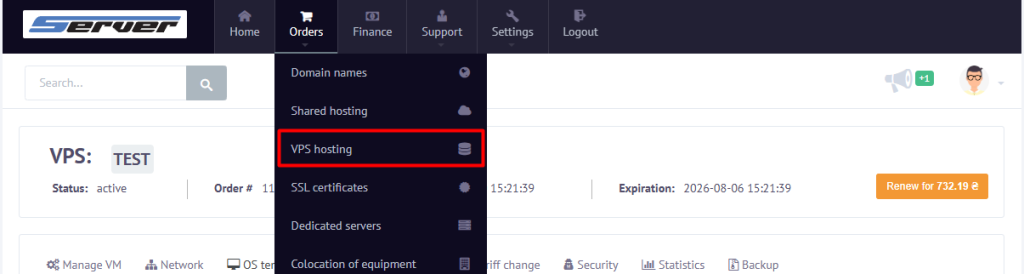
3. Select the VPS where Docker needs to be installed.
4. Go to OS Templates.

5. Open the Pre-installed programs list.
6. Select Docker + Compose install.
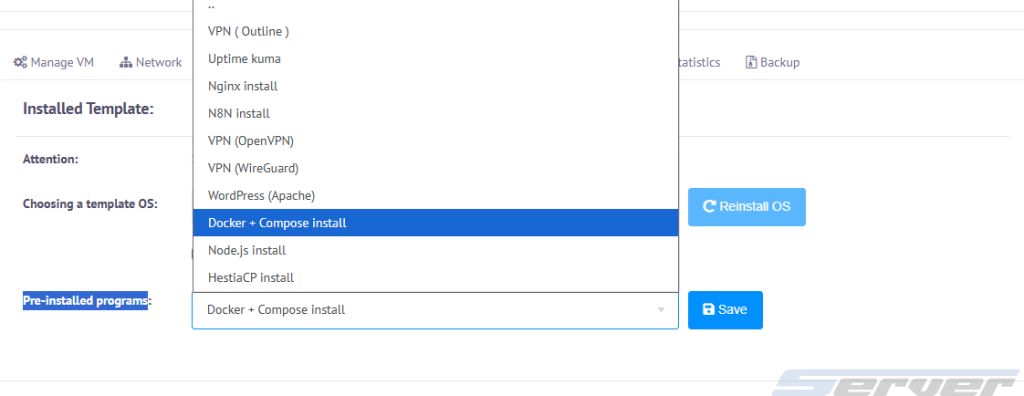
7. Start the installation of the operating system and the selected program.
Once the process is complete, Docker and Docker Compose will be installed on the VPS automatically. There is no need to download additional packages or configure repositories manually.
How to Check the Installation
Connect to the server via SSH and check the Docker version using the following command:
docker --versionThen check Docker Compose:
docker compose versionIf the commands return version numbers, both components have been installed and are ready to use.
What You Can Run in Docker
After installing Docker on the VPS, you can deploy different applications and server services, including:
- WordPress;
- Nginx;
- Uptime Kuma;
- n8n;
- database management systems;
- VPN servers;
- other applications available as Docker images.
The exact launch process depends on the selected container and its configuration.
What to Do If Docker Was Not Installed
Check whether the Docker + Compose install option was selected in the Pre-installed programs list before starting the operating system installation.
You should also connect to the VPS via SSH and run the version-check commands again. If the system does not recognize the docker or docker compose commands, the software may not have been installed correctly.
In this case, repeat the installation after confirming that the required program is selected in the operating system template.
Summary
The ready-made Docker + Compose install option simplifies preparing a VPS for running containers. Docker and Docker Compose are installed automatically together with the operating system, allowing you to start deploying the required services immediately.