Transferring account access to another user
How to transfer an account to a new owner
An account can be transferred to another person in two ways: by contacting support or by updating the owner’s details самостоятельно in the profile settings.
Transfer via support
If you don’t want or cannot change the data manually, you can submit a request to support. This is the simplest option if you want to avoid mistakes.
You can send a request via the support section in your personal account or by email:
client@rx-name.ua
client@server.ua
In your request, you need to provide the new owner’s details:
- Full name
- Email
- Phone number
- Residential address
After verification, the support team will update the information and transfer the account to the new user.
Changing the owner via profile settings
You can also transfer the account самостоятельно by editing the profile.
1 .To do this, log in to your personal account and go to Settings → Profile.

2. Then enter the new owner’s details:
- Full name or company name
- region
- contact phone number
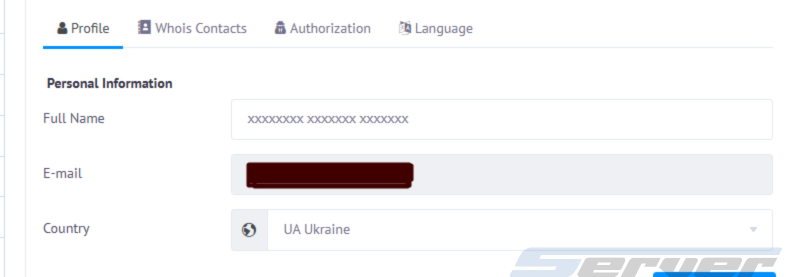
3. To fill in additional information, click Show more and add:
- city
- full address
- ZIP / postal code
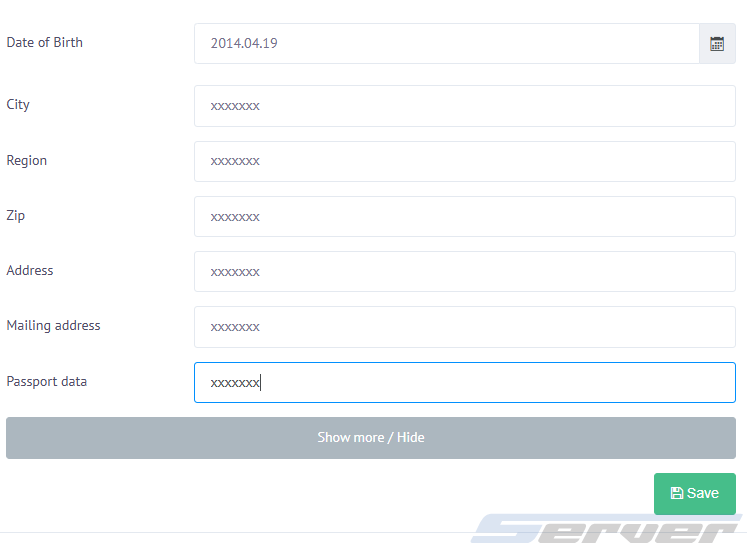
After saving the changes, the account will be reassigned to the new owner.